Software engineering
Synthetic Data Generation with OpenAI: A Comparative Study
Alex de Pablos Lopez13 min
In the era of Artificial Intelligence and Machine Learning, data is the engine that drives innovation and discovery. However, obtaining real data can present challenges, whether due to privacy issues, access limitations, or simply the unique nature of the required data. This is where synthetic data can play a crucial role.
Synthetic data, artificially generated rather than collected from the real world, can be an interesting solution to overcome these problems. But how do we generate synthetic data that is useful and relevant to our needs?
In this article, we will explore an innovative project that uses OpenAI’s Artificial Intelligence models to generate synthetic data based on JSON schemas. This project, called “Data Generator OpenAI (opens in a new tab)” is a Python application that uses OpenAI models to generate high-quality synthetic data with correlation among them.
Moreover, we will not limit ourselves to describing the project. We will also compare the results obtained with different OpenAI models, providing a detailed insight into their performance and efficiency in synthetic data generation.
Keep reading to explore how Artificial Intelligence can be an interesting tool in synthetic data generation.

Project Description
“Data Generator OpenAI” is a robust and flexible Python application designed to explore and demonstrate the capabilities of OpenAI’s Artificial Intelligence models in synthetic data generation. The application uses several OpenAI models, including gpt-3.5-turbo, text-davinci-003, text-curie-001, text-babbage-001, text-ada-001, and gpt-4-32K, to generate JSON objects that adhere to the schemas provided by the user.
The application is capable of generating multiple objects at once, allowing for efficient and scalable data production. Moreover, it is compatible with a variety of schemas and models, making it adaptable to a wide range of use cases.
A standout feature of “Data Generator OpenAI” is its report generation utility. This tool measures the time and cost of generating objects using different models and schemas, providing valuable insight into the performance and efficiency of OpenAI models. The results are written into a CSV file for further analysis.
“Data Generator OpenAI” is an open-source project, and its source code is available on GitLab for anyone interested in exploring or contributing to the project.
Technical Description of the Project
The project is structured into several Python modules, including app.py for the API server implementation, main.py for the main data generation logic, and generate-report.py for performance report generation. The project also includes a requirements.txt file that specifies the dependencies necessary to run the application, including openai, python-dotenv, requests, fastapi, pydantic, and uvicorn.
The project works by generating a prompt based on the provided schema and requesting the OpenAI model to generate a specific number of objects adhering to that schema definition. The models used include gpt-4, gpt-4-32K, text-davinci-003, text-curie-001, text-babbage-001, text-ada-001, and gpt-3.5-turbo.
The prompt used in the code is as follows:
From the following schema delimited by triple backticks:
Schema:
```{schema}```
Instructions:
1. Build a json object that adheres to the given schema.
2. Generate an array of {desired_number_of_objects} data objects of that previous json object.
3. Ensure coherence and correlation between related fields.
4. Fields should have valid values as it they were real data.
5. Phone numbers must have the correct number of digits.
6. Address should be with a valid zip code, etc.
7. We could have objects from different types in the same array. Meaning that if a field is country,
it could be US, ES, or any other country in the world, but the rest of the fields should be coherent
with the country.
Please generate the required data objects in a json array format and enclose the JSON array within
triple backticks and prefix it with `json`.
This prompt is used to guide the OpenAI model in generating the JSON objects. It is provided with a schema and asked to generate a specific number of objects adhering to that schema. Additionally, it is given specific instructions to ensure that fields of the generated objects are coherent and correlated, and field values are valid as if they were real data.
For example, phone numbers should have the correct number of digits, and addresses should have a valid zip code. The model is also allowed to generate different types of objects within the same array, meaning that if a field is a country, it could be any country worldwide, but the rest of the fields should be coherent with that country. Finally, the model is asked to generate the objects in a JSON array format and enclose the array within three backticks, prefixing it with json.
The application is implemented as an API server using FastAPI. The server provides a single endpoint, /generate, which accepts POST requests.
This endpoint accepts a SchemaInput object with the following properties:
schema_spec: A string representing the JSON schema to be used for generating the objects. This string can be a URL pointing to a JSON schema or the JSON schema itself. If schema_spec does not start with ‘http://’ or ‘https://’ or ‘{‘, an error is thrown.
num_objects: An integer representing the number of objects to generate. The default value is 1. If num_objects is less than 1 or more than 5, an error is thrown.
temperature: An optional float that controls the randomness of the OpenAI model’s responses. The default value is 0.0.
prompt: An optional string used as the prompt for the OpenAI model.
model: An optional string specifying the OpenAI model to use. The default value is “gpt-3.5-turbo”. If model is not one of the keys in main.MODELS, an error is thrown.
The /generate endpoint first checks if schema_spec is a URL. If so, it attempts to fetch the schema from the URL. If it cannot fetch the schema from the URL, it throws an HTTP 400 error. Then, it tries to generate the objects using main.get_objects(). If main.get_objects() throws an IncompleteJsonResponseError, the endpoint throws an HTTP 400 error. If main.get_objects() throws any other error, the endpoint throws an HTTP 500 error. If main.get_objects() succeeds, the endpoint returns an object containing the generated objects and the cost of generating them.
The output of the /generate endpoint is a JSON object that contains two main properties:
objects: This is a list of the generated JSON objects. Each object in the list is generated according to the schema provided in the input. The number of objects in the list equals the number specified in the num_objects input.cost: This is a number that represents the total cost in tokens of generating the objects. This cost is calculated by adding up the number of tokens in each response generated by the OpenAI model.
Therefore, the output provides both the generated data and a measure of the cost associated with generating that data. This can be useful for understanding the performance and efficiency of the OpenAI model in generating synthetic data.
Below is a possible valid HTTP call to this endpoint.
POST http://localhost:8000/generate Content-Type: application/json

{ "schema_spec": "https://tmpfiles.org/dl/1621427/jsonparsedschema.jcs", "num_objects": 3, "model": "gpt-3.5-turbo" }
The generate-report.py script generates a performance report that measures the time and cost of generating objects using different models and schemas. The script generates objects for all combinations of models, schemas, and number of elements, and writes the results to a CSV file.
The project requires an OpenAI API key, which should be provided in an environment variable named OPENAI_API_KEY. This variable can be set in a .env file in the project’s root directory.
Experimentation and Tests Conducted
Tests were carried out using various different schemas and models. The schemas used include complex-document.jcs, jsonparsedschema.jcs, medium-document.jcs, and testmap.avsc.
The OpenAI models used for these tests were:
- gpt-4-32K
- gpt-4
- gpt-3.5-turbo
- text-davinci-003
- text-curie-001
- text-babbage-001
- text-ada-001
The report generation script, generate-report.py, is responsible for generating objects for all combinations of models, schemas, and number of elements, and writes the results to a CSV file.
The process begins by loading the API keys and processing the local schemas. The schemas are uploaded to a cloud storage service (in this case, file.io is used) and the URLs of the uploaded schemas are stored for later use.
Once the schemas are ready, the numbers of elements to be generated are defined. In this case, lists of 1, 3, 5, and 10 elements have been used.
For each combination of model, schema, and number of elements, a run is performed. The start time is recorded, the main function to generate the objects is executed, and the elapsed time is calculated. The total cost of generating the objects is also calculated.
If any error occurs during the generation of the objects, the error is recorded and the process continues with the next combination. The results of each run, including the model, the schema, the number of elements, the elapsed time, the cost, the response URL, and any error, are written to the CSV file.
Finally, the total execution time and the total cost are recorded.
Analysis of the Results
We are going to analyze the results obtained from the tests carried out using various models, schemas, and the number of elements to generate. The data is collected in a CSV file that contains information about the model used, the schema, the number of elements to generate, the time taken, the cost incurred, the URL where you can access the generated data, and any error that may have occurred.
The models used in these tests include gpt-4, gpt-4-32K, text-davinci-003, text-curie-001, text-babbage-001, text-ada-001, and gpt-3.5-turbo. The schemas used are testmap.avsc, medium-document.jcs, jsonparsedschema.jcs, and complex-document.jcs.
Time and Cost
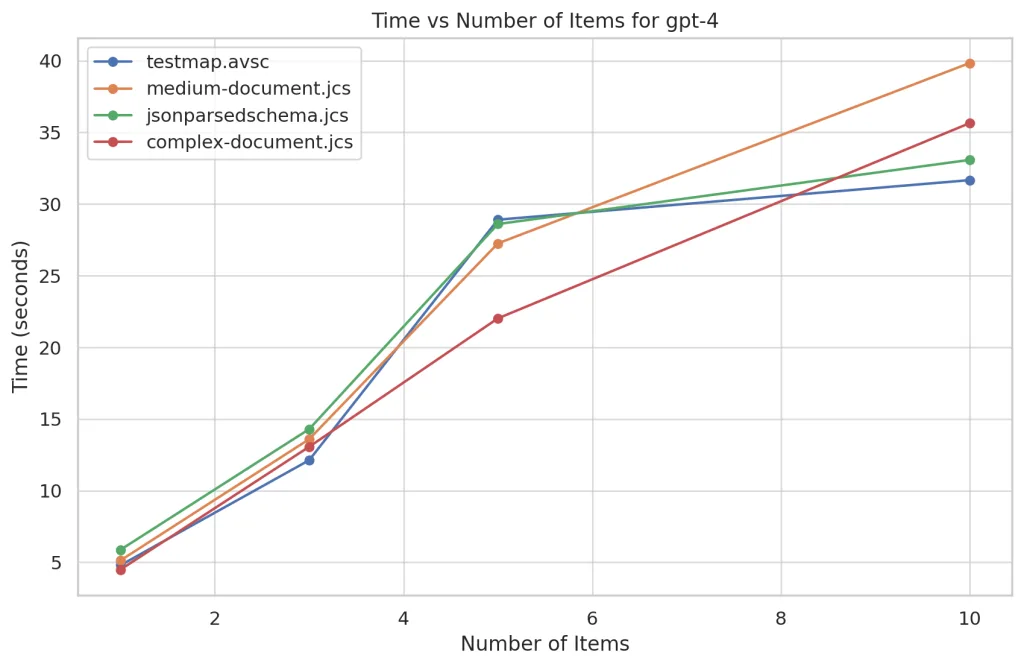
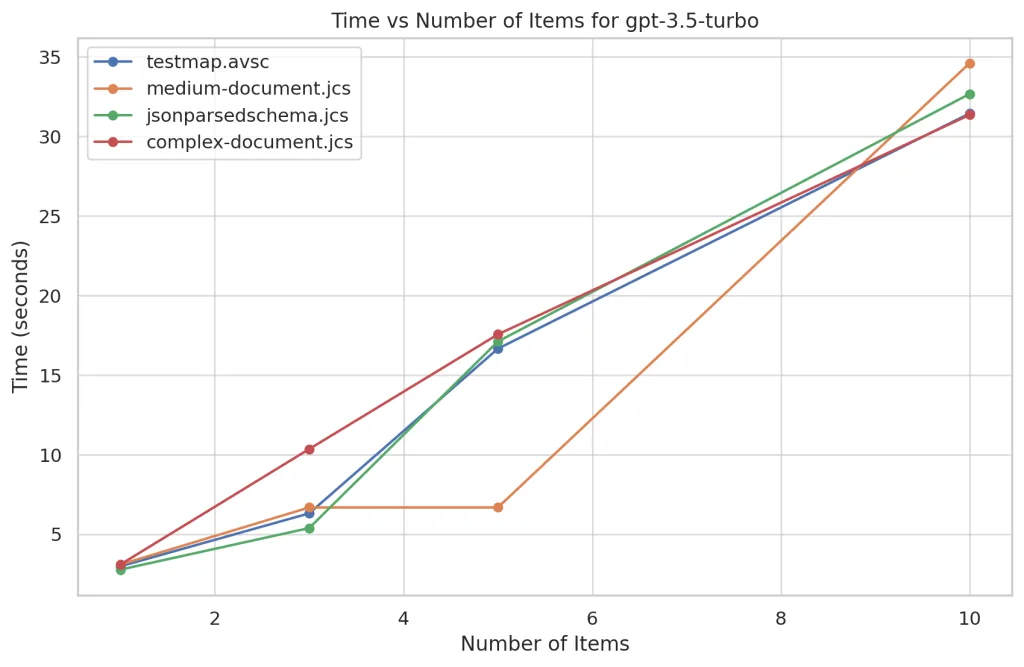
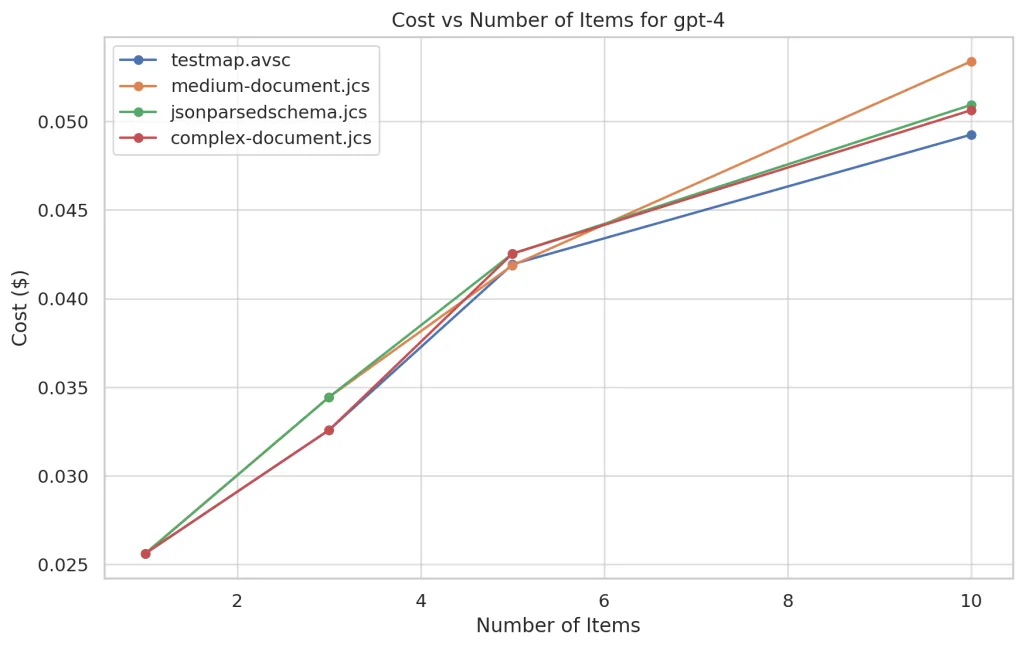
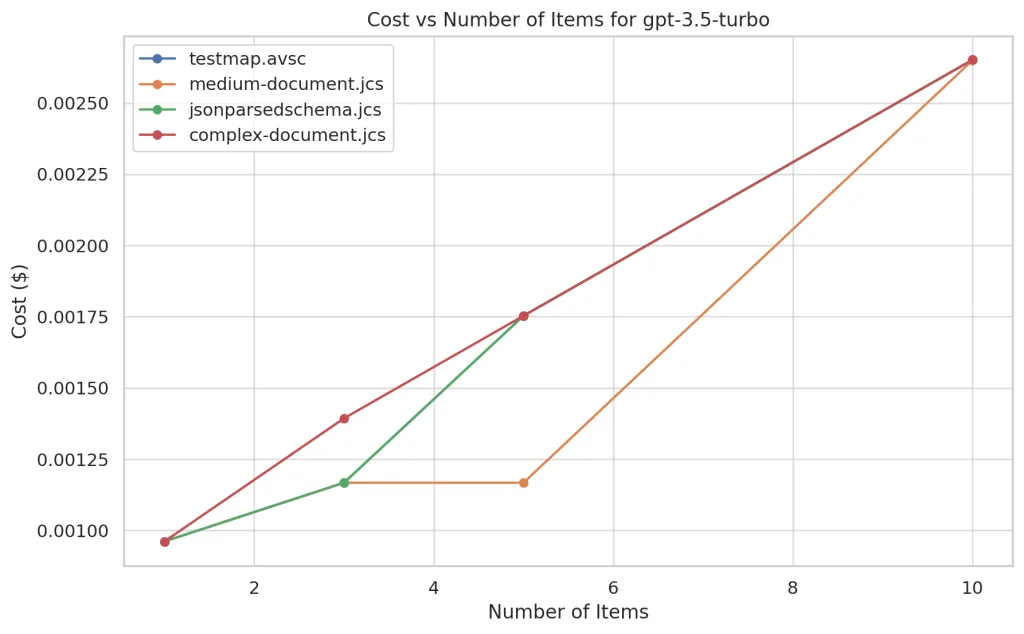
Time and cost are two critical factors to consider when evaluating the performance of the models. In general, it is observed that both time and cost increase with the number of elements processed. This is expected, as processing more elements requires more resources and time.
For example, for the gpt-4 model using the testmap.avsc schema, the time increased from approximately 4.80 seconds for one element to 31.67 seconds for 10 elements. The cost also increased from 0.0256 to 0.0493 in the same scenario.
Errors
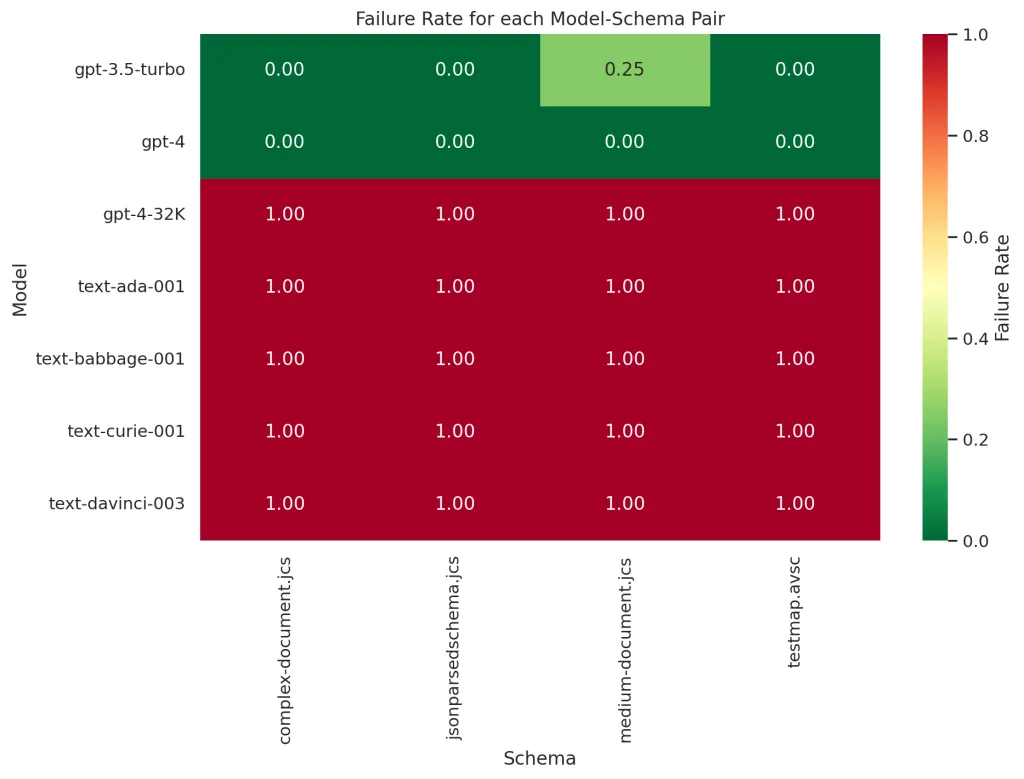
It is also important to take into account the errors that occurred during the tests. Some models, such as gpt-4-32K, text-davinci-003, text-curie-001, text-babbage-001, and text-ada-001, experienced errors during the tests. The errors vary from non-existent models to incomplete API responses.
For instance, all tests carried out with the gpt-4-32K model resulted in the error “The model gpt-4-32K does not exist”. This indicates that the gpt-4-32K model did not exist at the time of the tests.
Likewise, the rest of the errors with simpler models come from the model’s inability to generate the desired output, producing either empty or incomplete outputs.
Comparison of Models
When comparing the different models, gpt-3.5-turbo appears to be the most efficient in terms of time and cost. For example, for the testmap.avsc schema, gpt-3.5-turbo took approximately 2.98 seconds to process one element at a cost of 0.000961, while gpt-4 took approximately 4.80 seconds at a cost of 0.0256.
The rest of the models are not capable of generating a correct output for any of the schemas, demonstrating that perhaps this is not an appropriate use case for them.
Moreover, it is important to note that these results may vary depending on the specific conditions of the test, such as the load on OpenAI’s servers, since we are calling their APIs.
Conclusions
Although OpenAI models are powerful tools capable of generating synthetic data based on JSON schemas, they are not necessarily the most efficient option in terms of time and cost for this specific use case. However, this project serves as a fascinating and educational experiment that allows us to explore the capabilities and limitations of OpenAI models in synthetic data generation.
To put it in perspective, if we use a simple rule of three, we could say that generating 100,000 elements that fit the complex schema using GPT-4 would cost the not insignificant sum of $506! And that’s without mentioning that it would take 356,445 seconds, which equates to 4 days of continuous execution.
Probably, the classic rule of three is not the most accurate method to estimate the cost, but it certainly gives us an idea that this is not the most suitable path for the generation of large amounts of synthetic data.
And we’re not just talking about efficiency. We also have to consider the problems with context windows. As of today, the OpenAI model with the widest context window is the 3.5, with 16K tokens. Although this represents a considerable amount of information (about 50 pages), it is still far from what would mean generating 100K or 500K complex elements.
Therefore, although OpenAI models are incredibly useful and versatile tools, it is important to understand their limitations and apply them appropriately to achieve the best results.
Alternatives for Synthetic Data Generation
There are other techniques and tools for synthetic data generation that may be more suitable depending on the specific use case.
One of these alternatives is Generative Adversarial Networks (GANs), and in particular, Conditional Tabular GANs (opens in a new tab) (CT-GANs). GANs are a type of deep learning model used to generate synthetic data that are indistinguishable from real data. CT-GANs are a variant of GANs that are specifically designed to generate tabular data, making them particularly useful for generating schema-based synthetic data.
Advantages of CT-GANs:
- Ability to generate synthetic data that maintain the correlations and distributions of the original data.
- Flexibility to generate data for any schema, as long as suitable training data is available.
Disadvantages of CT-GANs:
- Need for a training dataset that represents the distribution of the data to be generated.
- The time and resources needed to train the model can be significant.
Another option is the use of software libraries specifically designed for synthetic data generation, such as Faker. Faker is a Python library that generates synthetic data for a variety of data types, including names, addresses, phone numbers, and more. Although Faker does not use Artificial Intelligence, it is a flexible and easy-to-use tool that may be sufficient for many use cases.
Advantages of Faker:
- Ease of use and flexibility to generate a wide variety of data types.
- No training or significant resources required to generate data.
Disadvantages of Faker:
-
The generated data do not maintain correlations between fields, which can be a problem for some use cases.
-
Data generation is completely random and does not rely on any specific schema or data distribution.
When choosing the appropriate tool or technique for synthetic data generation, it is important to consider several factors. These include the complexity and specificity of the data schema, the amount of data needed, the time and cost of data generation, and the limitations of different tools and techniques.
In summary, although OpenAI models offer an interesting and powerful solution for synthetic data generation, it is important to explore and understand the available alternatives to ensure you choose the best option for your specific needs.
References
- Project Repository: Data Generator OpenAI
- OpenAI API Documentation: OpenAI API
- Synthetic Data Generation Tool: Faker
Remember, learning is a journey, not a destination. So keep exploring, keep asking, keep learning. And while you do, don’t forget to enjoy the journey. See you in the next post, where we will continue to unravel the mysteries of Software Engineering together. Until next time!