Software engineering
Notion default date today
Alex de Pablos Lopez1 min
So, you want to create a column in Notion that automatically includes the current date when you add a new row to your table? No problem, I can help you with that.
To do this, we’ll need to create two columns. One will be an auxiliary column that we can set up so that it’s not visible in the table, and the other will contain the date.
Create the auxiliary column
First, let’s create the auxiliary column. I like to make this column a “Date” type, just in case I want to use it as a master column later on. I named mine “Added in table”
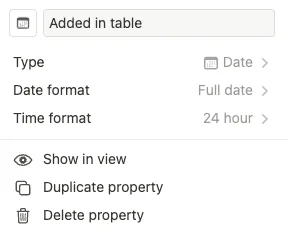
but you can name it whatever you want. Just make sure that, by default, this column is empty when you add a new row.
Create a column with the date
Next, we need to create a column that displays the date when the row was added. This column should be a “Formula” type.
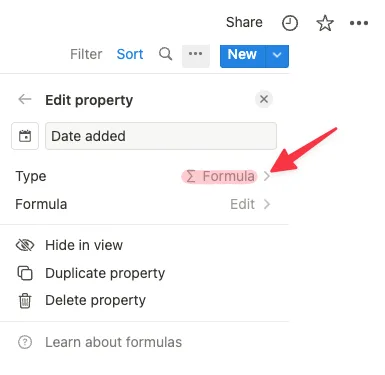
Just edit the property
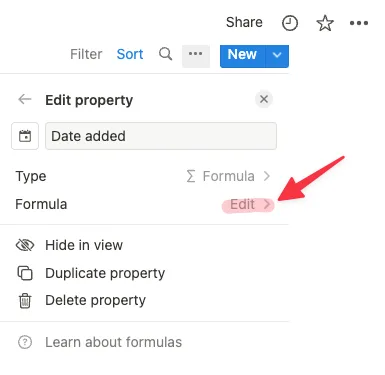
and enter the formula value as shown in the image.
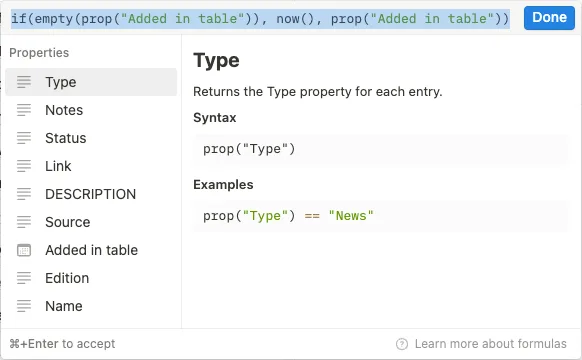
Make sure to replace “Added in table” with the name of the auxiliary column you created earlier.
Hide the auxiliary column
Finally, if you want to hide the auxiliary column so it doesn’t take up space in your table, click on the three dots at the end of the table and select the properties. From there, you can choose which properties to display and which to hide. In the image, you can see that the “Added in table” column has been hidden.
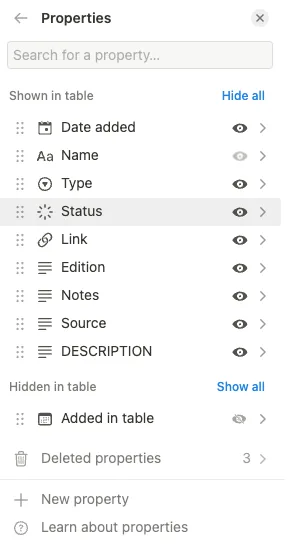
And that’s it! You now have a column that automatically includes the current date when you add a new row to your table. Let me know if you have any questions or need further assistance.