Software engineering
Discovering Llama 2: Meta’s Revolutionary Language Model
Alex de Pablos Lopez17 min
Imagine a new player arrives on the court, but instead of competing over who has the biggest ball, he decides to change the rules of the game. That is exactly what Meta has done with Llama 2.
They have entered the field of language models and said: “We are not here to see who has the most powerful model. We believe this should be open to everyone.” And just like that, they have broken the market open, brought their model and made it open source. Yes, friends, Llama 2 is here and it’s here to stay, revolutionizing the world of Artificial Intelligence with its open and accessible approach. Are you ready to discover it?
What is Llama 2?
Llama 2 is the new language model developed by Meta. This model comes in three different sizes: 7B, 13B and 70B parameters. This variety allows it to adapt to different needs and applications. But what really sets Llama 2 apart is its availability. Meta has decided to offer Llama 2 for free for research and commercial use. This means it can be accessed through providers like AWS and Hugging Face.
In addition, Llama 2 has been optimized for dialogue applications. To achieve this, a technique known as Human Feedback Reinforcement Learning (HFRL) has been used.
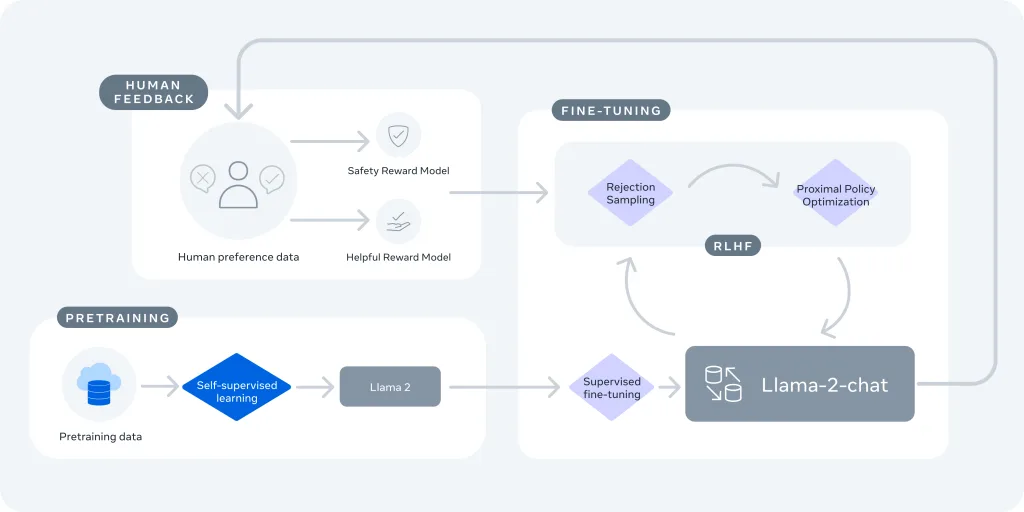
In short, Llama 2 is not only an improvement over its predecessor, but represents a shift in how artificial intelligence is shared and used.
Llama 2 Improvements
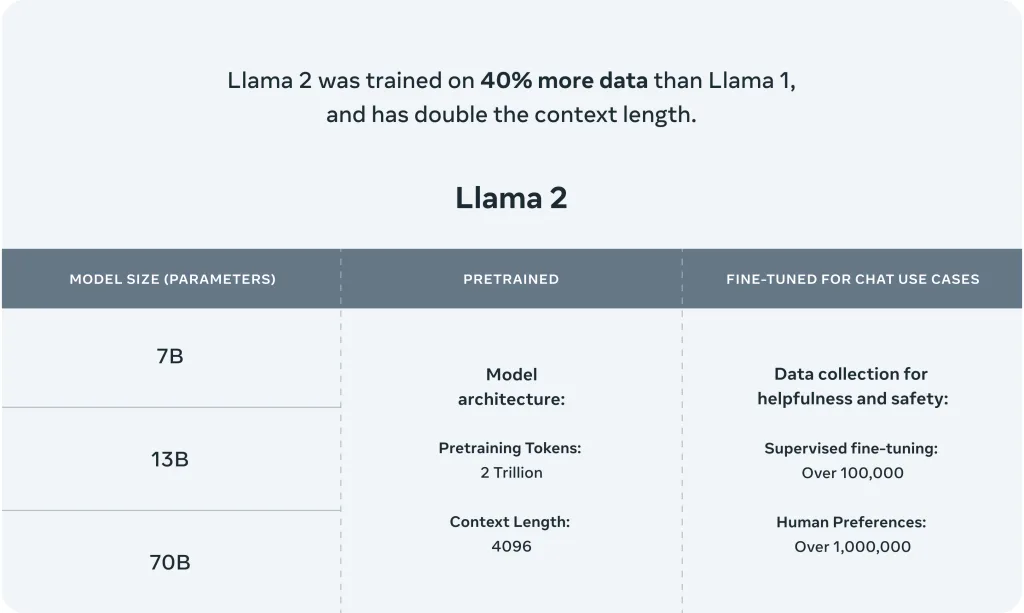
Llama 2 represents a significant leap in the development of language models. Compared to its predecessor, Llama 1, this new model has been trained on 2 trillion tokens of text, twice as much as Llama 1. In addition, Llama 2’s context length has also doubled, allowing the model to understand and generate longer, more complex texts.
The Llama 2 models have been fine-tuned with over 1 million human annotations, improving their ability to generate coherent, relevant responses. Llama 2 has also been optimized for conversational applications, making it ideal for use in chatbots and other conversation systems.
In terms of performance, Llama 2 outperforms other open source language models on many external benchmarks. According to data provided by Meta and Hugging Face, Llama 2 excels at reasoning, coding, competition and knowledge tests. This shows that Llama 2 is not only bigger and more powerful than its predecessor, but also smarter and more versatile.
You can find some Benchmarks here:
- Hugging Face Open LLM Leaderboard (opens in a new tab)
- Official Meta announcement (opens in a new tab)
Llama 2 vs GPT
When we talk about language models, it’s inevitable to compare Llama 2 to GPT-3.5, one of the most popular in the market. But how do they really compare? When should you use one over the other? Let’s break it down.
First, let’s talk about tokens. In the world of language models, a token can be a word, a letter, a number, or even a punctuation mark. When you interact with these models, both the questions you ask (prompt request tokens) and the answers you receive (completion response tokens) are counted in tokens.
Llama 2, and particularly its 70B parameter version, shines when it comes to tasks that depend heavily on the questions you ask, like text classification. In these cases, Llama 2 can be more efficient and economical than GPT-3.5. However, if your task involves generating a lot of text (many response tokens), GPT-3.5 may be a faster, cheaper option.
But what if your task doesn’t involve asking questions or you are processing large amounts of text at once? Here is where Llama 2 can have an advantage. Although generating responses with Llama 2 may be slower and more expensive than with GPT-3.5, processing the questions is really efficient. In fact, it can be up to three times cheaper than with GPT-3.5.
It is also important to keep in mind that closed source models like GPT-3.5 use various methods to drastically accelerate inference, such as quantization, mixture-of-experts, speculative sampling, and sophisticated tricks for large scale inference. However, for heavy prompting tasks, open source models like Llama 2 can be a more efficient option.
In summary, if you need to process a lot of text or ask many questions, Llama 2 is a good option. But for generating large amounts of new text, GPT-3.5 may work better. It depends on your specific needs.
Instructions; How to Talk to Llama 2?
One of the lesser-known advantages of open access models like Llama 2 is that you have full control over the system prompt in chat applications. This is essential for specifying your chat assistant’s behavior and even infusing some personality, something not possible in closed models behind APIs.
The prompt format would look like this:
<s>[INST] <<SYS>>
{{ system_prompt }}
<</SYS>>
{{ user_message }} [/INST]This format follows the model’s training procedure, as described in the Llama 2 paper (opens in a new tab). You can use any system_prompt you want, but it is crucial that the format matches what was used during training.
To explain it very clearly, this is what is actually sent to the language model when you type any text (for example, “There’s a llama in my garden 😱 What should I do?”) to start a chat:
<s>[INST] <<SYS>>
You are a helpful, respectful and honest assistant. Always answer as helpfully as possible, while being safe. Your answers should not include any harmful, unethical, racist, sexist, toxic, dangerous, or illegal content. Please ensure that your responses are socially unbiased and positive in nature.
If a question does not make any sense, or is not factually coherent, explain why instead of answering something not correct. If you don't know the answer to a question, please don't share false information.
<</SYS>>
There's a llama in my garden 😱 What should I do? [/INST]As you can see, the instructions between the special tokens <<SYS>> provide context to the model so it knows how it is expected to respond. This works because exactly the same format was used during training with a wide variety of system prompts for different tasks.
As the conversation progresses, all interactions between the human and the “bot” are added to the previous prompt, enclosed in [INST] delimiters. The template used during multi-turn conversations follows this structure:
<s>[INST] <<SYS>>
{{ system_prompt }}
<</SYS>>
{{ user_msg_1 }} [/INST] {{ model_answer_1 }} </s><s>[INST] {{ user_msg_2 }} [/INST]It is important to keep in mind that Llama 2, like other language models, has no internal memory of previous interactions. Every time you interact with the model, it’s as if it were the first time. That’s why it’s important to provide all the conversation context every time you interact with the model. This is why context length is a very important parameter to maximize, as it allows for longer conversations and greater amounts of information to be used.
In closed models based on APIs, people resort to tricks in an attempt to override the system prompt and change the model’s default behavior. However imaginative these solutions may be, this is unnecessary in open access models: anyone can use a different prompt, as long as they follow the format described above. This can be an important tool for researchers to study the impact of prompts on both desired and undesired characteristics.
The original HuggingFaceH4 demos returned a page-not-found message when checked on September 7, 2026. The alternative chat demos linked in Useful Resources below provide an interface for trying Llama 2:
How to Use Llama 2 Locally?
While Llama 2 is available through providers like Hugging Face, you can also choose to use it on your own machine. How cool is that? Warning to sailors, the process is somewhat technical, but I hope I have described it so you can follow it without a problem. Let’s do it!
-
Clone the repository: The first step is to clone the Llama 2 repository (opens in a new tab) from GitHub. To do this, open a terminal and type the following command:
git clone https://github.com/ggerganov/llama.cpp.git. This will download the Llama 2 source code to your local machine. -
Compile the code: Once you have cloned the repository, you will need to compile the code.
- Using Make
- On Linux or MacOS:
make - On Windows:
- Download the latest fortran version of w64devkit (opens in a new tab).
- Extract w64devkit on your PC.
- Run w64devkit.exe.
- Use the cd command to get to the llama.cpp folder.
- From here you can run:
make
- On Linux or MacOS:
- Using CMake
-
Install CMake: CMake is an open source build tool. If you are on Linux, you can install it with the following command: sudo apt-get install cmake. If you are on macOS, you can install it using Homebrew with the command: brew install cmake. If you already have CMake installed, you can skip this step. If you are on Windows… I’m sorry. No dude, you can still download the CMake installer from its official download page (opens in a new tab). Run the downloaded file and follow the installation wizard instructions.
-
Here are the commands you need:
cd llama.cpp
mkdir build
cd build
cmake ..
cmake --build . --config ReleaseThese commands create a build directory, navigate to that directory, generate the build files using CMake, and then compile the code.
-
- Using Make
-
Download models: To be able to run the LLM, you first need to have the models locally. To do this, you must request the download by filling out this Meta form (opens in a new tab).
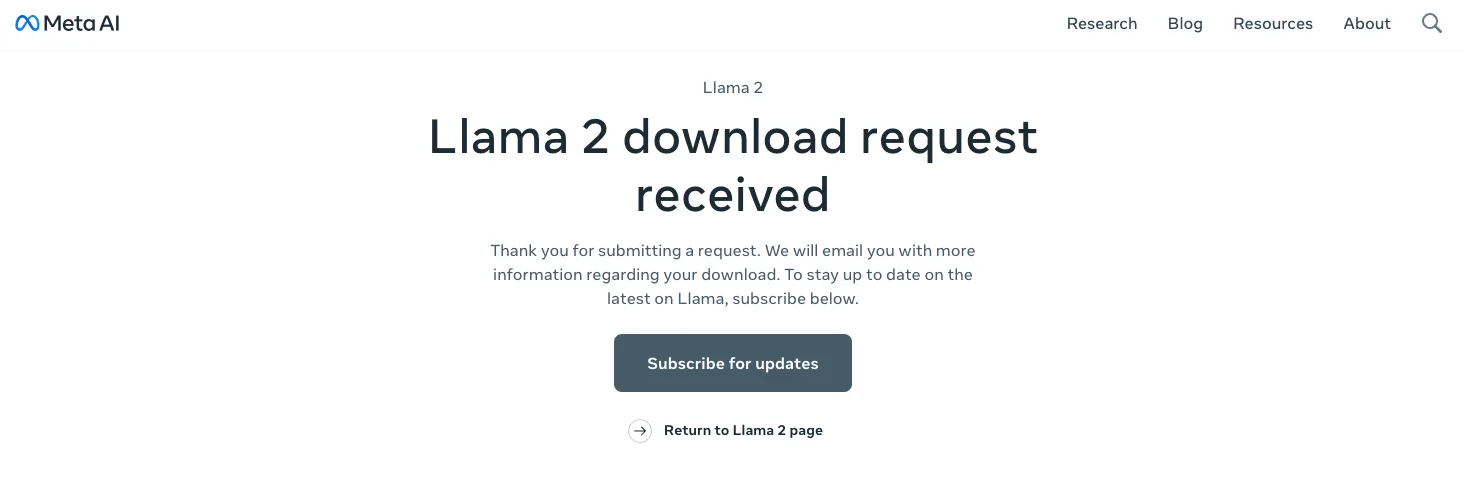
By doing so you will receive an email like this
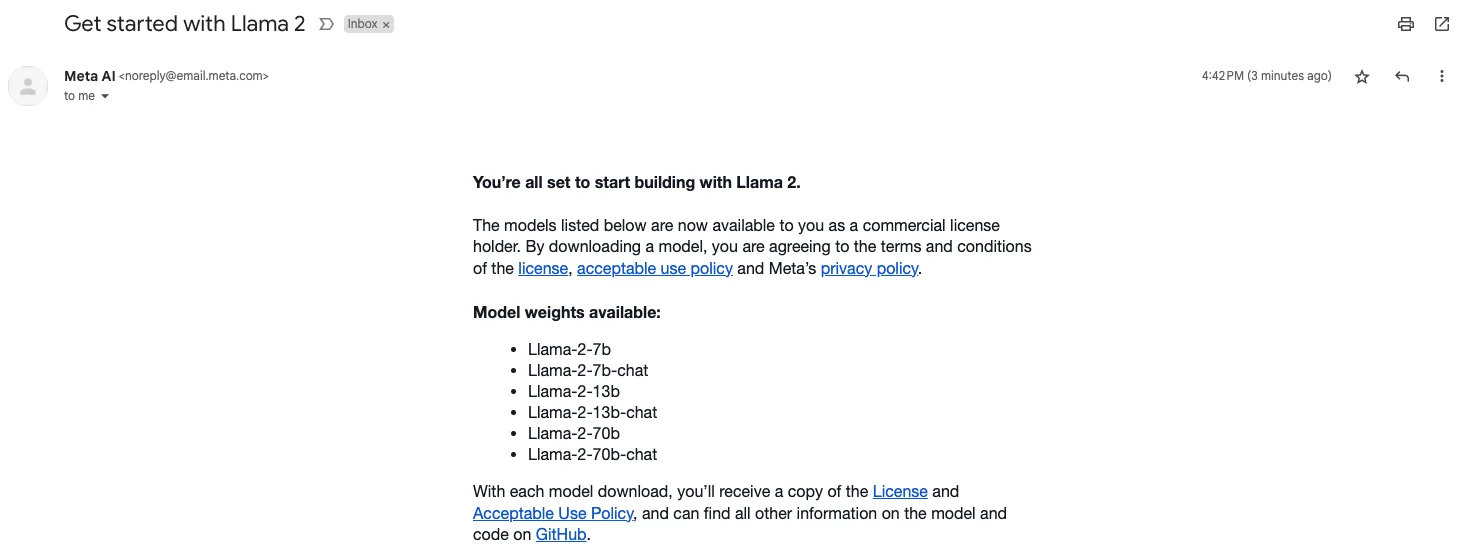
Where they will tell you how to proceed to download the models. The process is somewhat tedious, to be honest, but if you read the email and README.md (opens in a new tab) of the repository they refer to, you should be able to do it.
Here are the steps I did:
– Clone the repository: git clone https://github.com/facebookresearch/llama.git (opens in a new tab)
– Make the download.sh file executable: chmod +x download.sh
– Download wget: brew install wget
– Run the process: ./download.sh from the project root.
– Enter the url requested and sent by Meta in their email.
– Select the model(s) to download (in my case just the 7B). And… go make yourself a coffee, this will take a while!

When finished, you should have a
checklist.chkfile, anotherconsolidated.00.pthand anotherparams.json, in a directory called llama-2-7b. -
Convert 7B model to ggml FP16 format: The original LLaMA format downloaded is not directly compatible. Therefore this step is necessary. In addition, with this step the model size is reduced by half (from about 13 GB to about 6.5 GB), maintaining pretty good accuracy. It is also a necessary preparation for quantization.
We could say it is not a mandatory step, and you could skip it, but the impact on accuracy and performance would be greater.
To carry it out, you will need to run
python3 convert.py models/7B/from the root of the project, and have the 3 model files you downloaded in the previous step already in the models/7B directory. You will also need the tokenizer.model file. You can copy it from the llama project you used to download the model. It is located at the root.At the end of this step, you should have a ggml-model-f32.bin file in your models/7B directory.
-
Quantize the model to 4 bits (using q4_0 method): Quantizing the model to 4 bits is very important because it allows to drastically reduce the model size without affecting accuracy too much. It is a critical step that makes running LLaMA 7B on your computer feasible. Without quantization, very few would have the computing power to use it.
To perform quantization, run .
/quantize ./models/7B/ggml-model-f32.bin ./models/7B/ggml-model-q4_0.bin q4_0from the root of the project.At the end of the process, you should have a
ggml-model-q4_0.bin q4_0 filein your models/7B directory.Some benefits of quantizing to 4 bits:
- Reduces model size from 6.5GB (FP16) to just 3.5GB. Much more manageable.
- Allows the model to fit in memory and run on regular computers. Otherwise powerful servers would be required.
- Improves inference performance, since 4-bit integer calculations are faster.
- Enables running large models on resource constrained devices like phones, RPi, etc.
-
Run Llama 2: You can run Llama 2 in different ways. In its project README.md you will find the different options. Here I will leave you 2 of them.
-
./main -m ./models/7B/ggml-model-q4_0.bin -n 128
Generates text based on an initial prompt. It does not handle context beyond what is indicated in that prompt. In my opinion I think it can be used for simple text generation. -
./examples/chat.sh
This starts an interactive session with the 7B model by asking questions and allowing more natural conversation.Interactive mode is great for testing different prompts and seeing how the model responds. It also handles the conversation context.
-
-
Interact with Llama 2: You can now interact with Llama 2 directly from the command line! I understand the model will go faster or slower depending on your machine’s resources. I hope you have better luck than me there! As you can see in the video below, in my case the response speed leaves a lot to be desired… hehe. But it works! An LLM running on an M1 from a few years ago and without too many resources 👏.
How to use Llama 2 professionally in a company?
Llama 2 is not only a powerful tool for AI enthusiasts and researchers, but also a viable solution for companies looking to incorporate advanced language models into their operations. Several cloud platforms have already incorporated Llama 2 into their AI model catalogs, which facilitates its implementation in enterprise environments.
Microsoft announced at its Microsoft Inspire conference (opens in a new tab) that Llama 2 is available in the Azure AI model catalog. Developers can now use LLaMA on the Microsoft cloud. Llama 2 is also available on the Amazon SageMaker Jumpstart hub on AWS, with other providers coming in the future.
In addition, the introduction of an open ecosystem between Microsoft and Meta for interchangeable AI frameworks was announced. The work dates back to 2017 when Meta (then Facebook) introduced the Open Neural Network Exchange (ONNX) standard for deep learning models. Both companies committed to supporting the development of open AI, including providing greater access to foundational AI technologies “for the benefit of businesses worldwide”.
In terms of accountability in its use, Meta has said Llama 2 models are “red-teamed,” where staff looks for vulnerabilities within the model’s security architecture and ensures they are safe to use. Efforts have been made to generate “adversarial prompts” to help refine the model and make it more secure.
Llama 2 users must accept an ‘acceptable use’ policy, which prohibits certain use cases, including using the model to generate terrorist content, enable the illegal distribution of information or materials to minors, and create malicious code.
In short, Llama 2 is presented as a viable and powerful option for companies looking to leverage next-generation language models in their operations. With the support of cloud platforms like Azure and AWS, its implementation and use in a business environment becomes even more accessible for professional environments.
If you are looking for more practical documentation on this, I have not been able to play with it yet, but I have read about it, and I recommend you take a look at this article by Philipp Smith (opens in a new tab), which guides you step-by-step to fine-tune the 70B model using the AWS cloud.
In this other official guide (opens in a new tab) by Swati Gharse (opens in a new tab), you can see an introduction on how to start using Llama 2 on Azure.
How to Fine-tune Llama 2?
One of Llama 2’s great advantages is that, as open source, anyone can fine-tune the model for specific needs. This is achieved by training the model on new data relevant to the desired task.
For example, if you wanted Llama 2 to summarize dialogues, you could train it on a dataset of conversations and their corresponding summaries. This way, the model would learn to generate accurate dialogue summaries.
Let’s see a practical example of how to perform this fine-tuning process:
- Download the 7B parameter Llama 2 model and convert it to the Hugging Face format. This leverages their training libraries.
- Clone the Llama 2 inference repo and install dependencies:
git clone https://github.com/facebookresearch/llama.git - Run the download script
bash download.shand enter the URL Meta sent you to get the 7B model. - Convert the model with
convert_llama_weights_to_hf.py. This generates a HF format model inmodels_hf/7B.
- Clone the Llama 2 inference repo and install dependencies:
- Clone the llama-recipes repo containing training notebooks.
git clone https://github.com/facebookresearch/llama-recipes.git
- Run the
quickstart.ipynbnotebook changing the path to the converted model. This will train Llama 2 on summarizing dialogues using the samsum dataset.- In the notebook, set
model_idto your HF model path. - Execute all cells to train the model. This can take several hours even on GPU.
- In the notebook, set
- Save the trained model weights (adapters) for later use.
- The notebook will save the trained adapters to a specified directory, e.g.
/trained_model.
- The notebook will save the trained adapters to a specified directory, e.g.
- To inference with the fine-tuned model, load the adapters into the original 7B Llama 2 model. This leverages its full capabilities.
- Load 7B model with
LlamaForCausalLM() - Load adapters with
PeftModel()pointing to where you saved them. - Code example:
import torch from transformers import LlamaForCausalLM, LlamaTokenizer from peft import PeftModel, PeftConfig # Load tokenizer and base model tokenizer = LlamaTokenizer.from_pretrained(model_id) model = LlamaForCausalLM.from_pretrained(model_id) # Load trained adapters model = PeftModel.from_pretrained(model, "/trained_model")
- Load 7B model with
- Test on a sample dialogue and verify the model generates a good relevant summary.
- Prepare input with tokenizer
- Generate summary with
model.generate() - Check summary properly reflects the gist of the sample dialogue.
- Code example:
_# Dialogue example_
dialogue = """A: Hi Juan, are you busy tomorrow afternoon?
B: I think so, what's up? A: Can you come with me to the animal shelter? B: What do you want to do?
A: I want to adopt a puppy for my son
B: That will make him very happy
A: Yes, we've talked about it several times. I think he's ready now
""" _# Prepare input_
input = tokenizer(dialogo, return_tensors="pt") _# Generate summary_
resumen = model.generate(**input, max_new_tokens=50) _# Check summary properly reflects the gist of the dialogue_
print(tokenizer.decode(resumen[0]))
This way, by training Llama 2 on your own data, you can easily adapt it for any application. The possibilities are endless!
I hope this practical example gives you an idea of how to start exploiting Llama 2’s fine-tuning potential. Go ahead and give it a try!
Useful Resources
- Official paper (opens in a new tab)
- Models on Hugging Face (opens in a new tab)
- Leaderboard (opens in a new tab)
- Meta Examples (opens in a new tab)
- Chat demo (7B) (opens in a new tab)
- Chat demo (13B) (opens in a new tab)
- Chat demo (70B) usando TGI (opens in a new tab)
- A good compilation (opens in a new tab).
Conclusion
Well, friends, after this whole journey, what do we think of Llama 2? It seems like a real home run to me and a giant leap for open AI.
Running it locally is certainly not trivial. It requires quite a few steps, technical knowledge and, above all, a decent machine. So not suitable for everyone. But being able to talk to an AI model of this level on my own computer seems amazing to me.
At the corporate level, I think it opens up many new possibilities. No wonder the tech giants are jumping on the bandwagon. Having access to such powerful models to improve products and services will be of great value.
Of course, it’s not perfect. It still has its limitations in knowledge and biases that need to be further refined. But it is a big step forward in terms of scale, accessibility and transparency. The data reflects that it has become number 1 in open source LLMs.
There is no doubt that it is revolutionary and that it has entered the generative AI field strongly, setting a new standard for openness and collaboration. What do you think?
Remember, learning is a journey, not a destination. So keep exploring, keep asking, keep learning. And while you do, don’t forget to enjoy the journey. See you in the next post, where we will continue to unravel the mysteries of Software Engineering together. Until next time!