Software engineering
Understanding Python imports, __init__ y python path
Alex de Pablos Lopez14 min
What is the difference between a package and a module? how does the init.py script work? what is the PYTHONPATH?
Let’s go for it! We will do it through an example, which is how things are best understood.
The repository that accompanied this tutorial was not publicly accessible when checked on September 7, 2026. You can follow the code examples below.
Modules dependencies in Python
Before getting into the matter, let me tell you about the difference between a module and a package in Python. It’s simple.
-
Module : A Python script by itself.
-
Package : A set of modules.
Come on now! Prepare your favorite IDE that we are going to cut.
We are going to create a file structure like the following:
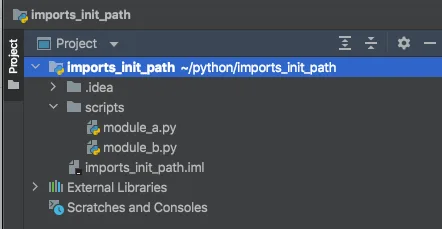
And we’re going to create some functionality in those two Python files module_a.py and module_b.py.
In the module_a.py file we are going to add the following code:
# module_a.py
A_CONSTANT = 'I am a string constant within the python module a'


def multiply(number: int, times: int):
    print(times, " times ", number, " is ", times * number)
We have the constant A_CONSTANT, which is nothing more than a specific String, and the function duplicate, which will print on the screen the value of the multiple of the two numbers that arrive as a parameter.
And in the module_b.py file we are going to see how to make use of the functionality offered by module_a.py.
# module_b.py
import module_a

print("The imported string constant is: ", module_a.A_CONSTANT)

module_a.multiply(2, 5)
From this module_b.py script the value of the module_a.py constant is printed and the function is called with parameters 2 and 5.
Running the module_b.py script we get the following output:

Execution log output MODULE_b.py
To make a module accessible from another, you simply have to do an import indicating the name of the module in question.
Once done, with that same name you can access everything that the module offers through a point >> name_module.functionality.
Likewise, if for any reason it is not convenient for us to access that way, when doing the import we can indicate the alias that we want to use to do so:
# module_b.py
import module_a as a

print("The imported string constant is: ", a.A_CONSTANT)

a.multiply(2, 5)
In this way, by simply using the indicated alias (in this case a), the functionality of the module can be accessed.
What actually happens when you write an import command in Python?
The Python interpreter tries to look for the directory that contains the module we’re trying to import in sys.path , which is nothing more than an array with a list of directories that Python will look for modules and packages when it’s done with cached modules and standard libraries.
Nothing better to see what we are talking about than trying it ourselves.
Let’s go to the mess!
If we modify the script of module_b.py to include the lines to print the value of sys.path:
# module_b.py
import sys

print(sys.path)

import a

print("The imported string constant is: ", a.A_CONSTANT)

a.multiply(2, 5)
And we run it, we get the following output when the sys.path is printed. Notice that in my case I am using Intellij as IDE and I have a Python virtual environment with pyenv. This output may vary in your case.
['{YOUR_WORKSPACE}/imports_init_path/scripts', '{YOUR_WORKSPACE}/imports_init_path', '{YOUR_USER_PATH}/Library/Application Support/JetBrains/IntelliJIdea2021.2/plugins/python/helpers/pycharm_display', '{YOUR_USER_PATH}/.pyenv/versions/3.10.2/lib/python310.zip', '{YOUR_USER_PATH}/.pyenv/versions/3.10.2/lib/python3.10', '{YOUR_USER_PATH}/.pyenv/versions/3.10.2/lib/python3.10/lib-dynload', '{YOUR_USER_PATH}/.pyenv/versions/3.10.2/lib/python3.10/site-packages', '{YOUR_USER_PATH}/Library/Application Support/JetBrains/IntelliJIdea2021.2/plugins/python/helpers/pycharm_matplotlib_backend']As you can see, in the first position of the sys.path array we have the directory where we create scripts. This is no coincidence, it is that the output of sys.path will always have in position 0 the directory of the script that is being executed.
This is the main reason when both scripts are in the same directory.
Import only certain elements of a Python module
In our example there is very little functionality, but you may come across a module that has many functionalities and you don’t need more than some of them.
What does really happen when you have an import?
When the module is imported as we have seen so far, the entire module is imported.
Proving it is simple.
We are going to make a call from the same module b to the multiply function.
This is how the script would look:
# module_a.py
A_CONSTANT = 'I am a string constant within the python module a'


def multiply(number: int, times: int):
    print(times, " times ", number, " is ", times * number)


multiply(10, 10)
And if we now execute our script module a.py, we will see that in the output we have printed twice what the multiply function prints, once with the values 10, 10 and once with the values 5, 2.

Workaround to avoid executions when a module is imported
The code inside the if name == ‘main‘ statement will not be executed on import. It will instead be executed when the module is executed itself.
# module_a.py
A_CONSTANT = 'I am a string constant within the python module a'


def multiply(number: int, times: int):
    print(times, " times ", number, " is ", times * number)


if __name__ == '__main__':
    multiply(10, 10)
If we run module_b.py now, the output we get is the original.

And if we execute module_a.py
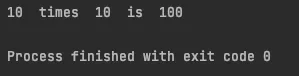
Import a specific function
We have to indicate from which module we want to import which function.
# module_b.py
from module_a import multiply

multiply(2, 5)
In this way, if we execute the module_b.py we get the following output.
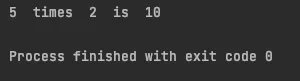
In this way we avoid having to use the period character to specify, and we can simply call the function itself without much problem.
If we would like to add more than one functionality to a module, we can do so separated by commas.
from module_a import multiply, A_CONSTANT
Likewise, if you want to import all the functions and objects of a module, you can also do it like this:
from module_a import *
If you have understood what has been said so far, you may be wondering what is the difference between from module_a import * and an import module_a.
The answer at the end of operation is none. It is considered a bad practice because it negatively impacts the readability of the code.
PYTHONPATH
On many occasions there are certain utilities that may be common and that we want to have as such in a utils, common or similar package.
As before, we are going to continue learning by getting our hands dirty. So grab your IDE again, let’s continue!
We are going to create a folder of utils utilities in our project, another of common things common, and we are going to create another module from where we are going to make use of them.
In the utils folder we are going to have a module_string.py module and another module_number.py. In the common folder we are going to have a constants.py constants module and finally our new module_c.py module from where we will use all this.
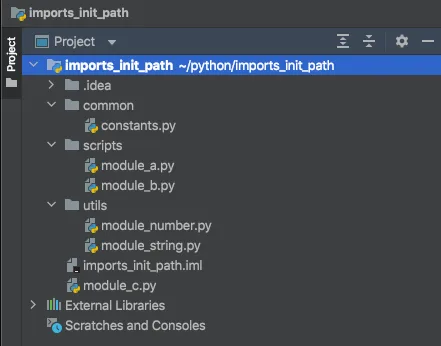
Well, we are going to use from our module_c.py the utils string module.
# module_c.py

import utils.module_string

no_capitalized = "bla bla bla"
capitalized = utils.string.capitalize(no_capitalized)
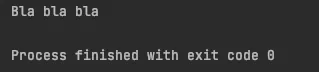
print(capitalized)
Executing the script we have the following output:
If instead doing
import utils.module\_string
We had done
import string
We had gotten ModuleNotFoundError: No module named ‘module_string’.
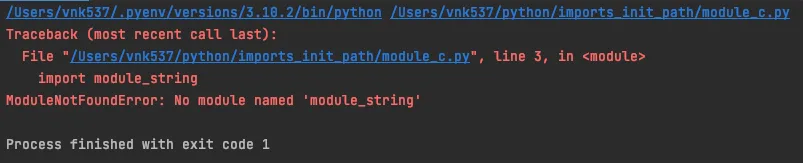
Why? because the sys.path we saw earlier does not contain the utils directory, which is needed to find the string module.
How to add a directory in the sys.path?
There are two ways of doing this.
Using sys.path.append
The sys.path array is just that, an array. We can use the append function to add the path that interests us to the array.
In this case we want to include the path where the utilities are located. In my case it is /Users/vnk537/python/imports_init_path/utils.
To achieve this, we can modify the module_c.py script to read as follows:
import os
import sys
fpath = os.path.join(os.path.dirname(__file__), 'utils')
sys.path.append(fpath)
print(sys.path)

import module_string

no_capitalized = "bla bla bla"
capitalized = module_string.capitalize(no_capitalized)
print(capitalized)
What we’re doing with those added lines is nothing more or less than including the path we need in the sys.path array.
We know that if we concatenate the module_c.py script path (os.path.dirname(file)) with the utils literal, we will get the path we are looking for.
If we run the module_c.py script now, we will have the following output:

Considerations:
-
Only after adding the path to the sys.path array is it possible to import the module.
-
os.path.dirname(__file__)returns the absolute path of the script’s working directory from where it is run.
USING PYTHONPATH ENVIRONMENT VARIABLE
PYTHONPATH is an environment variable that you can set to add additional directories where Python will look for modules and packages.
Like any other environment variable, before modifying it, you have to consider the values that it may already have.
I advise you to check the current value of the variable in your system.
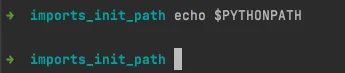
In my case it is empty, but even so, the good practice to add values is to take into account its previous value.
Being in the root directory of the project, where our utils folder is located, we execute the following command:
export PYTHONPATH=$PYTHONPATH:$(pwd)/utils

Once this is done, we no longer need to manage the sys.path array, so we leave the module_c.py script as originally:
# module_c.py
import module_string

no_capitalized = "bla bla bla"
capitalized = module_string.capitalize(no_capitalized)
print(capitalized)
And executing it we would have the following output:

Considerations:
- When you close python, the list will revert to its default values. If you want to permanently add the directory to the
PYTHONPATHvariable, you can add the export command to include it in your~/.bashrc.
Now that Python knows that utils is part of our path, you can choose one method or another to use the dependencies.
Let’s make up our module_c.py script!
# module_c.py
import module_string
import module_number

no_capitalized = "bla bla bla"
capitalized = module_string.capitalize(no_capitalized)
print(capitalized)

to_evaluate = "123d123"
print("Is ", to_evaluate, " numeric? >> ", module_string.is_numeric(to_evaluate))

with_upper_case = "I dO NoT thinK THis WiLl WorK..."
in_lower_case = module_string.to_lower_case(with_upper_case)
print(in_lower_case)

rest = module_number.module(23, 7)
print("The rest is: ", rest)
Executing it like that we have the following output:
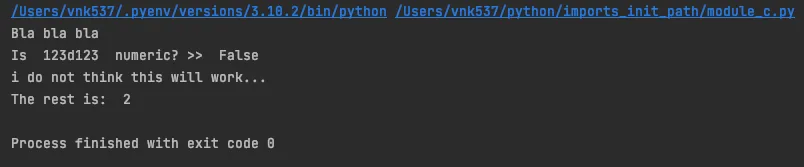
If you notice, we are adding all the modules that the utils folder contains.
But…
Wouldn’t it be even better if we could do something like import utils instead of having to do it module by module? More comfortable and cleaner, right? Well… keep reading!
What is __init__.py and when we need it?
The init.py file is used to convert a directory into a proper Python package.
When the Python interpreter comes across such a file, it knows that everything in that directory is a package itself.
We are going to continue with our trend of learning by getting our hands dirty.
First of all, if in the previous steps we had modified the PYTHONPATH environment variable, rollback it and leave it as it was before you touched it.
Let’s create a new module module_d.py. For now we’re just going to import utils and see what happens.
# module_d.py
import utils
If we execute the module as such, there is no problem and the process ends with output 0.

All normal apparently. Now let’s try to access our function.
is_numeric
which is located in module_string.py.
This is how our new script would look:
# module_d.py
import utils

to_evaluate = "123d123"
print("Is ", to_evaluate, " numeric? >> ", utils.is_numeric(to_evaluate))
Executing it…
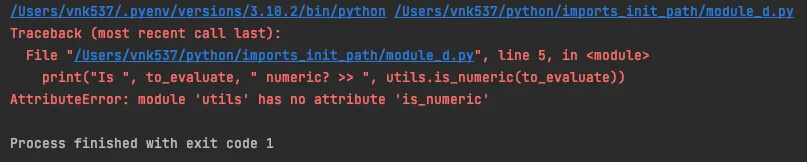
The Python interpreter tells us that there is no is_numeric attribute on the utils module.
And it is that the interpreter simply does not know that utils is a package. As you can see, he treats it like a module.
Now that we know what the init.py file is for, let’s put it into practice!
Let’s create the file in the utils directory, so that the interpreter treats the directory as a Python package.
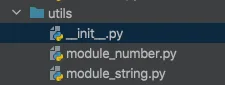
Inside this init.py file, we can import all the modules that are necessary for our project.
How to import from __init__.py
Intuition in this world of ones and zeros is sometimes a bad adviser…
A more than reasonable way to do the import in our init.py would be the following:
# utils/__init__.py

from module_string import is_numeric
It is so consistent that if we add this line to the previous code
print(is_numeric("17923"))
And we execute the init.py file, we get an output that is not only consistent, but also correct and expected.

We are going to remove that last line from init.py, and from our module_d.py we are going to see what happens now that the interpreter already knows that the utils folder is a package, and that it has modules inside.
When running module_d.py this is what the console shows:
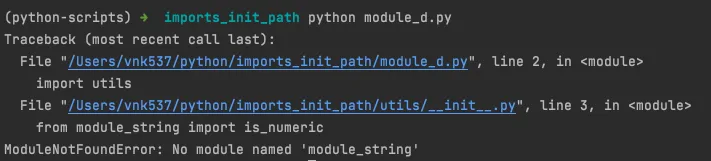
But…wait a minute Python…are you kidding me? I buy that this is the only phrase that goes through your head at this moment.
However, as almost always in this world of machines, they are right.
And it is that although apparently the imports from the init.py were more than consistent, we are making the call from the module_d.py file, so the sys.path array will only have its directory to search for the imports.
Therefore, when the interpreter encounters the import utils, although this time it does see it as a package and the init.py file is executed, when it does, the sys.path array is not automatically updated and the interpreter has no way to know where to find the module_string.py module.
We need to tell the interpreter where the utils directory is located.
To do so, we can either:
-
Make use of the PYTHONPATH environment variable (we saw it above).
-
Use relative imports (not recommended).
-
Use absolute imports (better choice).
relatives IMPORTS
# utils/__init__.py

from .module_string import is_numeric

print(is_numeric("17923"))
Absolute IMPORTS
# utils/__init__.py

from utils.module_string import is_numeric
And the output…

Everything under control.
Thanks to this way of importing the package through our defined init.py, the code is much cleaner and in our module_d.py script we can make use of all the functionality that we need from within the package with code like this:
# utils/__init__.py

from utils.module_string import is_numeric
from utils.module_string import capitalize
from utils.module_number import module
# module_d.py
import utils
no_capitalized = "bla bla bla"
capitalized = utils.capitalize(no_capitalized)
print(capitalized)
to_evaluate = "123d123"
print("Is ", to_evaluate, " numeric? >> ", utils.is_numeric(to_evaluate))
rest = utils.module(23, 7)
print("The rest is: ", rest)One of the nicest things about this way of doing things is that the utils package can be imported from anywhere and used almost immediately.
So that you believe it, as always, we are going to see it with an example.
We create the module_e.py script, inside our scripts folder, to use the utils package from there.
This is the content of our new script:
# scripts/module_e.py

import os
import sys
PROJECT_ROOT = os.path.abspath(os.path.join(
    os.path.dirname(__file__),
    os.pardir)
)
sys.path.append(PROJECT_ROOT)

import utils
print(utils.capitalize("this is all in lower case."))
If you execute…

Happy ending! 🎉
At this point I guess you won’t need me to explain why the script is working, but since I’m a bit of a pain in the ass, let me do it one last time.
Before importing the utils package, we need to make sure that the parent directory of utils (the root in this case) is accessible to the Python interpreter.
It would be unwise to assume that it will happen by default. We are now one level into the root directory of the project (we are running the script from the scripts folder), sys.path will have /Users/vnk537/python/imports_init_path/scripts at index 0.
That is the reason why we have to add the value of the parent path to the array. In our case /Users/vnk537/python/imports_init_path.
Once you know it you have already seen how trivial it is to use the utils package from there. As simple as importing it and… using it!
Conclusion
These kinds of bugs in python can be a real headache, especially if you’re just starting to deal with it and have never looked at how the interpreter actually works and what’s going on underneath.
Once the process is understood, everything makes more sense.
Make sure the Python interpreter has access to each package or module you are trying to import. If not, modify the sys.path array to add the directory in question, or do so by modifying the PYTHONPATH environment variable.